
ConsentLab — Documentation
Lightweight cookie consent manager for Joomla 5 & 6.
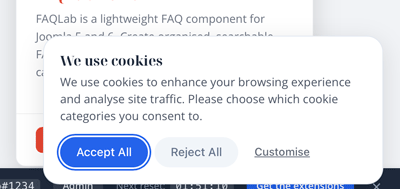
ConsentLab is a focused cookie consent extension that handles GDPR and ePrivacy compliance without the complexity of a full privacy platform. It injects a configurable consent banner, blocks scripts until visitors consent, and logs every decision server-side. No SaaS subscription, no external dependencies, and under 6 KB on the frontend.
Requirements
- Joomla 5.0 or later (including Joomla 6)
- PHP 8.1 or later
- MySQL 5.7+ or MariaDB 10.3+
Installation
- Download the
pkg_consentlab-1.0.0.zippackage file. - In your Joomla admin panel, go to System > Install > Extensions.
- Upload the package file and click Upload & Install.
- The installer will set up the component, the system plugin (banner and script blocking), and the content plugin (shortcode).
- The consent banner will appear on your frontend immediately after installation.
Getting Started
Cookie Categories
ConsentLab ships with four pre-seeded cookie categories:
- Strictly Necessary — required, locked on, cannot be rejected by visitors.
- Analytics — tracking and analytics scripts (e.g. Google Analytics).
- Marketing — advertising and remarketing scripts.
- Preferences — functionality cookies (e.g. language, theme preferences).
To manage categories:
- Go to Components > ConsentLab > Cookie Categories.
- Each category has a Name, Alias (used for script blocking), Description, and a Required flag.
- Click New to add a category, or click an existing one to edit.
- Use the ordering handles to arrange categories in the banner.
- Publish or unpublish categories to control which appear in the consent banner.
Required categories are displayed with a locked toggle in the banner — visitors can see them but cannot disable them.
Banner Positions
Configure the banner position in Components > ConsentLab > Options > Display:
- Bottom Bar (default) — full-width bar fixed to the bottom of the viewport.
- Top Bar — full-width bar fixed to the top of the viewport.
- Corner Left — compact dialog in the bottom-left corner.
- Corner Right — compact dialog in the bottom-right corner.
- Centre Modal — centred overlay dialog with a backdrop.
Display Options
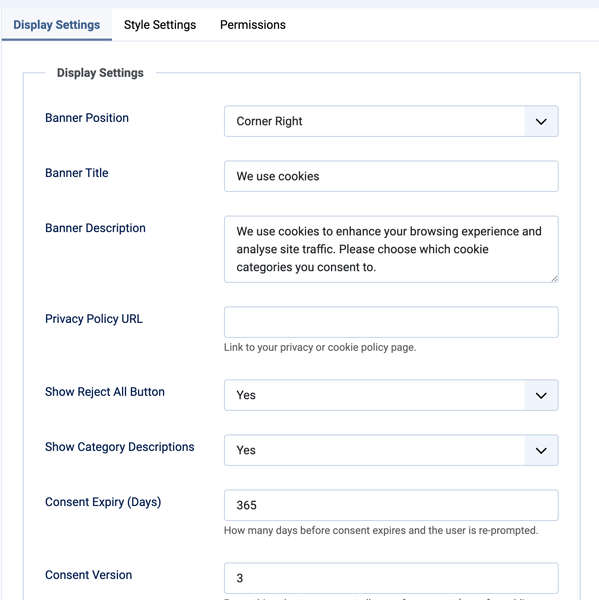
In Components > ConsentLab > Options > Display, you can also configure:
- Banner Title — heading text displayed in the banner.
- Show Banner Title — hide the visible heading while retaining it as the banner's accessible label.
- Banner Description — body text explaining your cookie usage.
- Privacy Policy URL — link to your privacy policy page. Displayed as a link in the banner.
- Show Reject All — show or hide the "Reject All" button. When hidden, visitors must use individual toggles or accept all.
- Show Category Details — show or hide the expandable category descriptions in the banner.
- Consent Expiry (Days) — how long the consent cookie lasts before re-prompting (default: 365 days).
- Consent Version — increment this number to re-prompt all visitors. Useful when your cookie policy changes.
- IP Anonymise — truncate the last octet of IP addresses stored in the consent log.
- Log Retention (Days) — automatically purge consent log entries older than this value (0 = keep indefinitely).
Changing Frontend Button Text
Frontend labels use Joomla language constants rather than hard-coded English. To customise a label, go to System > Manage > Language Overrides, select the site language, and create an override for the relevant constant:
PLG_SYSTEM_CONSENTLAB_ACCEPT_ALLPLG_SYSTEM_CONSENTLAB_REJECT_ALLPLG_SYSTEM_CONSENTLAB_CUSTOMISEPLG_SYSTEM_CONSENTLAB_SAVE_PREFERENCES
Create overrides separately for each site language on multilingual sites.
Script Blocking
ConsentLab blocks third-party scripts until the visitor consents to the relevant category. This is handled server-side by the system plugin — scripts are rewritten before the browser sees them.
How to Tag Scripts
Add a data-consentlab attribute to any <script> tag with the category alias:
<!-- Google Analytics -- blocked until "analytics" category is accepted -->
<script data-consentlab="analytics" src="https://www.googletagmanager.com/gtag/js?id=G-XXXXXXX"></script>

<!-- Facebook Pixel -- blocked until "marketing" category is accepted -->
<script data-consentlab="marketing">
  fbq('init', '123456789');
  fbq('track', 'PageView');
</script>

<!-- Third-party chat widget -- blocked until "preferences" category is accepted -->
<script data-consentlab="preferences" src="https://chat.example.com/widget.js"></script>
How It Works
- The system plugin scans the page output for
<script>tags withdata-consentlabattributes. - It rewrites their
typeattribute totext/plain, preventing execution. - When a visitor grants consent for a category, the frontend JavaScript activates the matching scripts by restoring their original type.
- Scripts in the “strictly-necessary” category (or whatever alias your required category uses) are never blocked.
Important Notes
- The
data-consentlabvalue must match the alias of a published cookie category exactly. - Inline scripts and external scripts are both supported.
- Scripts without a
data-consentlabattribute are not affected. - If you add scripts via Joomla’s
addScript()API, you will need to add them as raw<script>tags with the attribute instead, or use a template override.
Consent Log
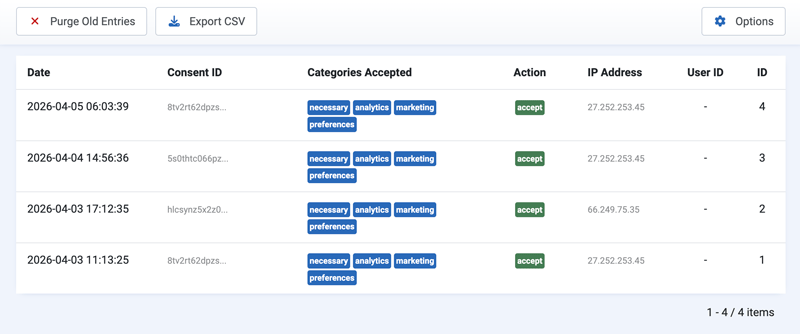
Every time a visitor accepts, rejects, or modifies their consent, the decision is logged server-side.
Viewing the Log
- Go to Components > ConsentLab > Consent Log.
- The list shows each consent record with: date, action (accepted/rejected/updated), categories accepted, IP address, and user agent.
CSV Export
Click the Export CSV toolbar button to download the full consent log as a CSV file. Useful for compliance audits and record-keeping.
Purging Old Entries
- Automatic — set a Log Retention (Days) value in the component options. Entries older than this are purged on each page load.
- Manual — use the Purge toolbar button to remove entries older than a specified number of days.
Shortcode
ConsentLab includes a content plugin that provides a shortcode for embedding a “Manage Cookie Preferences” link anywhere on your site.
Setup
- Go to System > Plugins and ensure Content - ConsentLab is enabled (it is enabled by default on install).
- In any article or custom HTML module, add the shortcode:
{consentlab manage}
This renders a link that opens the consent preferences dialog when clicked, allowing visitors to review and change their cookie choices at any time.
Usage Tips
- Place it in your privacy policy page so visitors can update preferences.
- Add it to a footer module for site-wide access.
- The link triggers
ConsentLab.showPreferences()— no page reload required. - The shortcode works in standard articles and in any content that triggers Joomla’s content prepare event.
Style Options
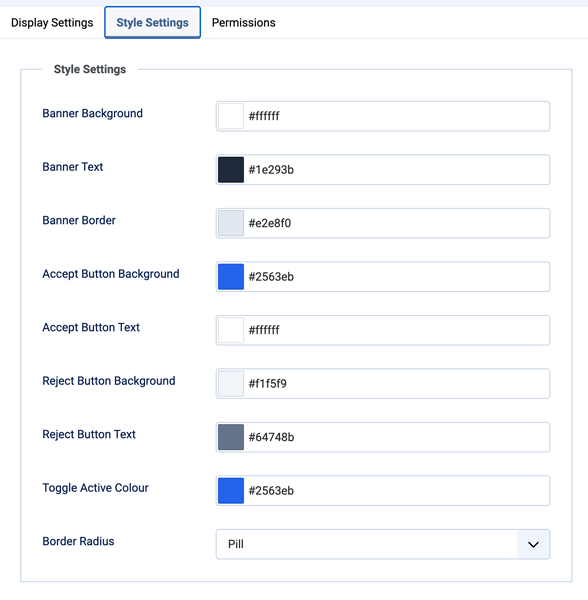
Configure the visual appearance in Components > ConsentLab > Options > Style:
- Banner Background — background colour for the consent banner.
- Banner Text — text colour for the banner.
- Banner Border — border colour for the banner.
- Accept Button Background — background colour for the Accept / Accept All button.
- Accept Button Text — text colour for the Accept button.
- Reject Button Background — background colour for the Reject All button.
- Reject Button Text — text colour for the Reject button.
- Toggle Active Colour — colour for the active state of category toggles.
- Border Radius — Square, Rounded (default), or Pill.
All colours are applied via CSS custom properties, making them easy to override in your template CSS if needed.
Template Overrides
Layout Overrides
ConsentLab’s banner markup is injected by the system plugin, but the component views (admin) follow standard Joomla MVC patterns. To override the frontend banner and preferences dialog, you can create template overrides:
templates/{your-template}/html/plg_system_consentlab/banner.php
CSS Classes Reference
The Custom Banner Class field under Options > Style adds one or more sanitized classes to the banner container, allowing site-specific styling without editing ConsentLab files.
.consentlab-overlay— backdrop overlay (centre modal position).consentlab-banner— main banner container.consentlab-banner--bottom— bottom bar position modifier.consentlab-banner--top— top bar position modifier.consentlab-banner--corner-left— corner left position modifier.consentlab-banner--corner-right— corner right position modifier.consentlab-banner--centre— centre modal position modifier.consentlab-header— banner header section.consentlab-title— banner title text.consentlab-description— banner description text.consentlab-privacy-link— privacy policy link.consentlab-categories— category toggles container.consentlab-category— individual category row.consentlab-category-name— category name label.consentlab-category-description— category description text.consentlab-toggle— toggle switch container.consentlab-toggle-input— hidden checkbox input.consentlab-toggle-slider— visible toggle slider.consentlab-toggle--required— locked toggle modifier for required categories.consentlab-actions— button row container.consentlab-btn-accept— Accept / Accept All button.consentlab-btn-reject— Reject All button.consentlab-btn-save— Save Preferences button.consentlab-btn-details— Show/Hide Details toggle button
CSS Custom Properties
Set via inline style on .consentlab-banner, overridable in your template CSS:
--consentlab-banner-bg--consentlab-banner-text--consentlab-banner-border--consentlab-accept-bg--consentlab-accept-text--consentlab-reject-bg--consentlab-reject-text--consentlab-toggle-active--consentlab-border-radius
JavaScript API
ConsentLab exposes a public API on window.ConsentLab for programmatic interaction:
ConsentLab.showPreferences()
Opens the consent preferences dialog, allowing the visitor to review and change their category choices.
document.querySelector('.manage-cookies').addEventListener('click', function (e) {
    e.preventDefault();
    ConsentLab.showPreferences();
});
ConsentLab.hasConsent(category)
Returns true if the visitor has accepted the specified category, false otherwise.
if (ConsentLab.hasConsent('analytics')) {
    // Load analytics script
}
ConsentLab.getConsent()
Returns the full consent object with all category states.
var consent = ConsentLab.getConsent();
// { necessary: true, analytics: false, marketing: false, preferences: true }
ConsentLab.revokeConsent()
Revokes all consent, clears the consent cookie, and re-displays the consent banner.
document.querySelector('.revoke-cookies').addEventListener('click', function (e) {
    e.preventDefault();
    ConsentLab.revokeConsent();
});
Usage Notes
- The API is available after the ConsentLab script loads. If you need to call it early, wait for the
DOMContentLoadedevent. hasConsent()accepts the category alias (e.g.‘analytics’,‘marketing’).- Changes made via the API are reflected immediately — scripts are activated or deactivated and the consent cookie is updated.
Support
For help, feature requests, or bug reports, visit the ConsentLab page on the TDCLab extensions site:
https://extensions.thedesigncompany.co.nz
Licence
ConsentLab is free software released under the GNU General Public License v2 or later.