
SiteMapLab — Documentation
Automatic /sitemap.xml for Joomla 5 and 6 — zero server configuration required.
SiteMapLab generates a standards-compliant XML sitemap from your menu items, articles, and categories and serves it at /sitemap.xml via a system plugin. No .htaccess edits, no rewrite rules. It also includes an HTML sitemap page, a URL exclusion manager, and optional IndexNow notifications for Bing and Yandex.
Requirements
- Joomla 5.0 or 6.0
- PHP 8.1 or later
- MySQL 5.7+ or MariaDB 10.4+
- Any modern browser (Chrome, Firefox, Safari, Edge)
What’s Included
- com_sitemaplab — Component with admin dashboard, exclusion manager, and component options
- plg_system_sitemaplab — System plugin that serves
/sitemap.xmland injects the sitemap link tag into every page
Installation
- Log in to your Joomla administrator.
- Go to System → Install → Extensions.
- Upload
pkg_sitemaplab-1.0.1.zipusing the Upload Package File tab. - Click Install.
- Go to Extensions → Plugins, search for SiteMapLab, and enable the System — SiteMapLab plugin.
To uninstall, go to System → Manage → Extensions, find SiteMapLab Package, and click Uninstall. All SiteMapLab tables are removed automatically.
Getting Started
Step 1 — Verify your sitemap
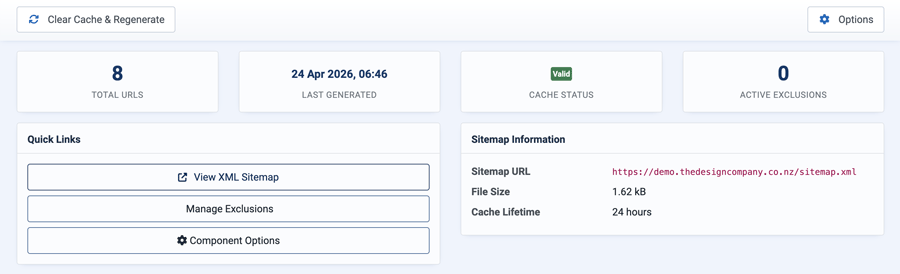
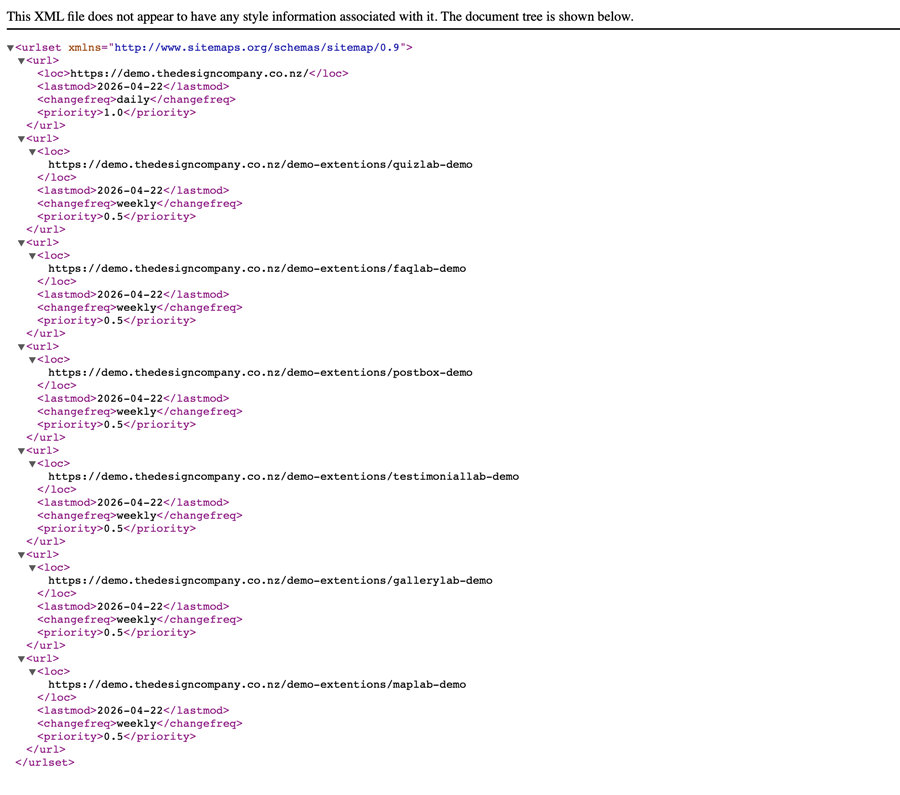
After enabling the system plugin, visit https://yoursite.com/sitemap.xml. You should see a valid XML sitemap containing your published menu items, articles, and categories. The sitemap is generated and cached automatically on first visit.
Step 2 — Submit to search engines
Copy your sitemap URL from the SiteMapLab dashboard and submit it to:
- Google Search Console — go to Sitemaps in the left menu and paste the URL
- Bing Webmaster Tools — go to Sitemaps and paste the URL
Step 3 — Add an HTML sitemap page (optional)
- Go to Menus → Add New Menu Item.
- Set the Menu Item Type to SiteMapLab → HTML Sitemap.
- Save. Visitors can now access a formatted sitemap page on your site.
Content Sources
SiteMapLab collects URLs from four sources. Each can be toggled on or off in Component Options → Content Sources.
Menu Items
All published, publicly accessible front-end menu items are included. The homepage receives a higher priority (1.0) and daily change frequency by default; all other menu items use the default settings.
Articles
Published Joomla articles are included if they are reachable via a menu item or a category menu item. Articles with no navigable path from the menu are excluded — these would not be crawlable by search engines anyway.
Content Categories
Published content categories that have a dedicated menu item are included.
Extensions
Other TDCLab extensions — and any third-party extension that includes a SiteMapLab integration plugin — can add their own URLs to your sitemap automatically. Toggle Include Extensions off if you want to exclude all extension URLs.
URL Exclusion Manager
The exclusion manager lets you prevent specific URLs from appearing in your sitemap. Go to Components → SiteMapLab → Exclusions and click New.
Each rule has three match types:
- Exact Match — removes only the URL that matches exactly (e.g.
/thank-you) - Prefix Match — removes all URLs that start with the given path (e.g.
/membersremoves all URLs under that section) - Contains — removes all URLs that contain the given string anywhere in the URL
After adding or editing exclusions, click Clear Cache & Regenerate on the dashboard to apply them immediately.
Search Engine Notifications
SiteMapLab can automatically notify search engines when content is saved. Go to Component Options → Search Engine Notification and enable Auto-notify on Content Save.
IndexNow (Bing & Yandex)
Enable IndexNow and enter your IndexNow API key. Generate a free key at indexnow.org. Each time an article is saved, SiteMapLab pings Bing and Yandex instantly — no waiting for the next scheduled crawl.
Component Options
Sitemap Settings
- Cache Lifetime — How long the generated sitemap is cached before regenerating. Options: Disabled, 1 hour, 6 hours, 12 hours, 24 hours. Default: 24 hours.
- Default Change Frequency — The
changefreqvalue applied to all URLs except the homepage. Default: Weekly. - Default Priority — The
priorityvalue (0.0–1.0) applied to all URLs except the homepage. Default: 0.5. - Homepage Change Frequency — The
changefreqfor the homepage entry. Default: Daily. - Homepage Priority — The
priorityfor the homepage entry. Default: 1.0.
Content Sources
- Include Menu Items — Include published front-end menu items. Default: Yes.
- Include Articles — Include published Joomla articles. Default: Yes.
- Include Categories — Include published content categories. Default: Yes.
- Include Extensions — Include URLs contributed by SiteMapLab integration plugins. Default: Yes.
Search Engine Notification
- Auto-notify on Content Save — Ping search engines and clear the sitemap cache when an article is saved. Default: No.
- IndexNow (Bing, Yandex) — Notify via the IndexNow protocol. Requires Auto-notify to be enabled. Default: Yes.
- IndexNow API Key — Your API key from indexnow.org.
Changelog
v1.0.1 (April 2026)
- Fixed extension plugin URLs not appearing in sitemap
- Fixed
/administrator/URLs appearing when regenerated from admin dashboard - Fixed PHP errors during plugin loading silently aborting extension URL collection
- Fixed dashboard stats showing zero after clearing cache
- Added support for third-party extensions via the
sitemaplabplugin group
v1.0.0 (April 2026)
- Initial release
- XML sitemap generation from menu items, articles, and content categories
- HTML sitemap front-end view
- Automatic
/sitemap.xmlserving via system plugin - Sitemap
<link>tag injected into every page - URL exclusion manager with exact, prefix, and contains matching
- Configurable cache lifetime, change frequency, and priority
- IndexNow ping support
- Admin dashboard with cache stats
- Sitemap index support for sites with over 50,000 URLs
Support
For support, documentation updates, and bug reports visit extensions.thedesigncompany.co.nz.
Licence
SiteMapLab is released under the GNU General Public Licence version 2 or later.