
Includes: Component, Site Module, Plugin
TicketLab Pro
Sell and manage event tickets inside Joomla. TicketLab Pro combines event pages, flexible ticket types, Stripe Checkout, attendee registration, QR tickets, door scanning, refunds, reports, and a frontend organiser dashboard in one package for Joomla 5 and 6.
Create free or paid events, assign multiple organisers, collect the registration details you need, and give your door team a mobile scanner. Purchasers receive individual tickets by email and can open mobile tickets or download PDFs. Administrators can manage orders, attendee lists, discounts, add-ons, refunds, and event reporting from Joomla.

About this Extension
TicketLab Pro is an event ticketing package for Joomla 5 and 6. Publish event pages, offer free or paid ticket types, take card payments through Stripe Checkout, email individual QR tickets, scan arrivals at the door, and follow sales and attendance from Joomla.
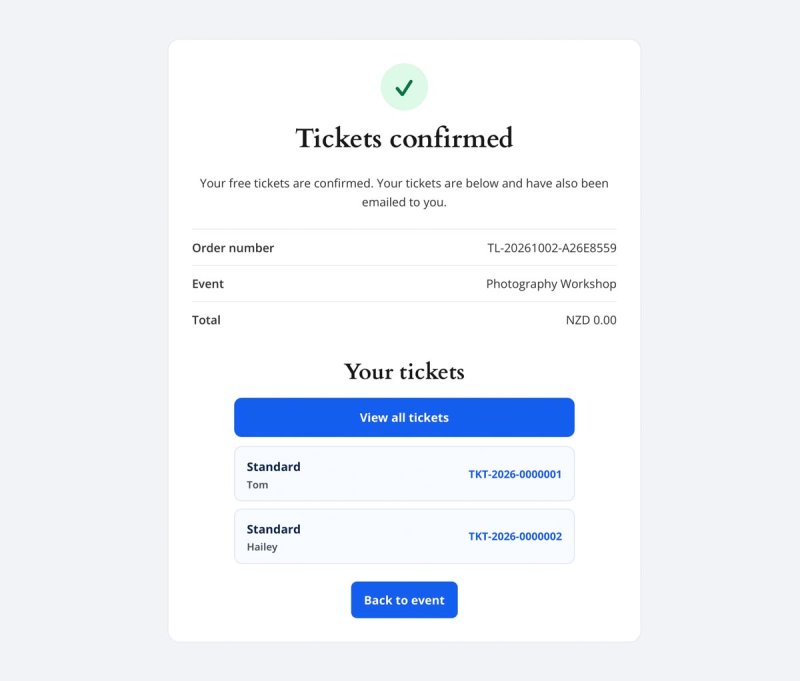
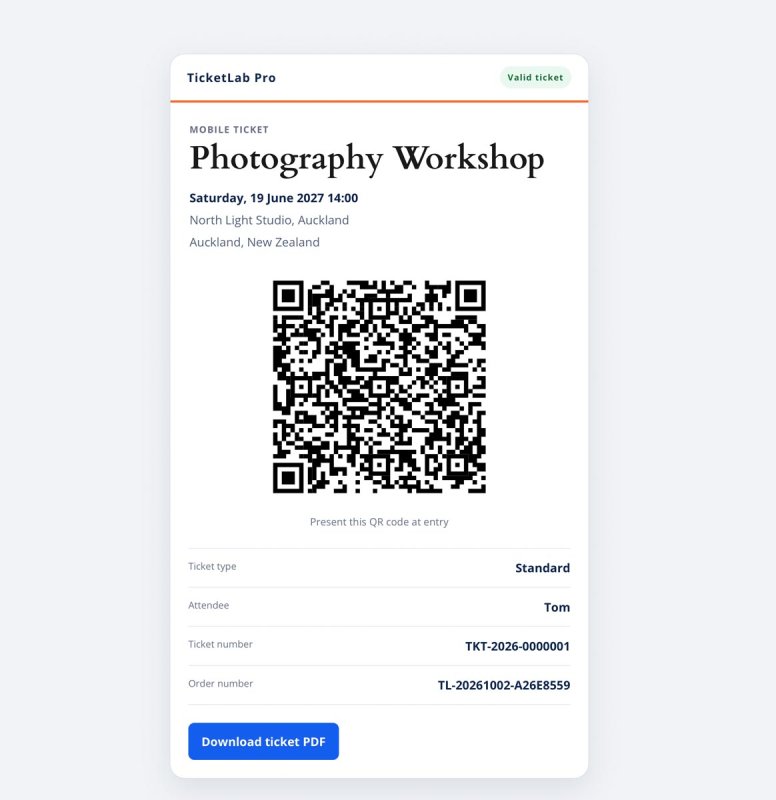
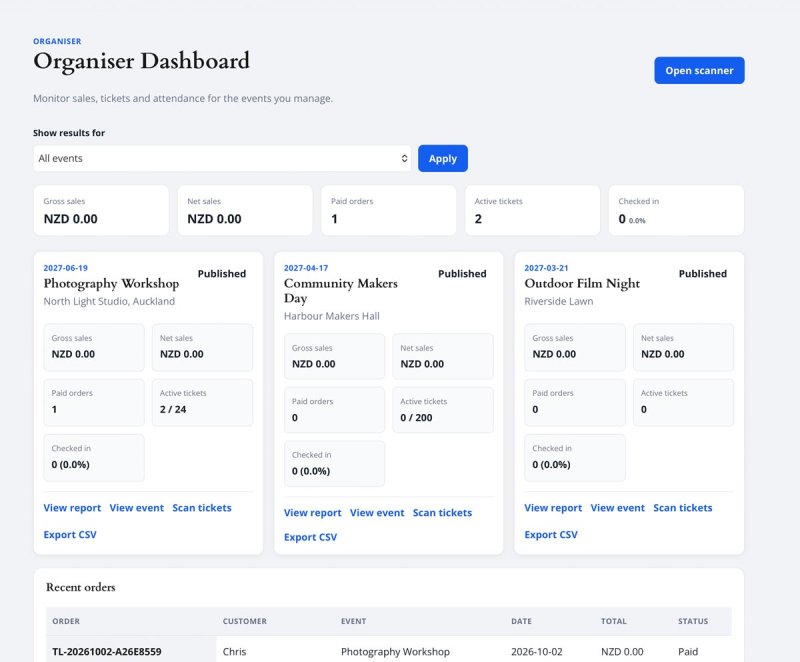
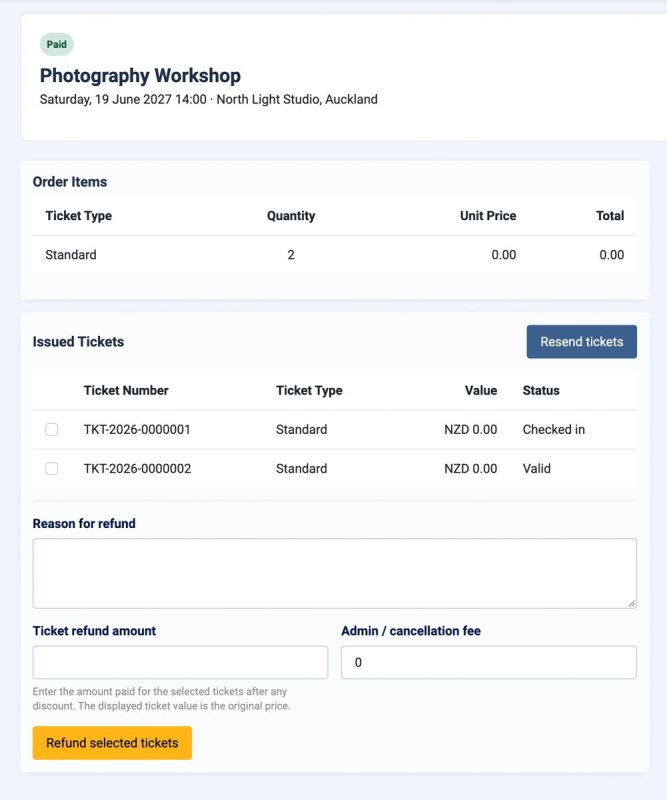
See TicketLab Pro in Action



Who It’s For
- Venues and event teams — run public events with one place for tickets, attendee lists, check-in and refunds.
- Conferences and community organisers — manage several ticket types, collect event-specific registration details and share access with multiple organisers.
- Fundraisers and festivals — offer sponsorship contributions, merchandise or digital add-ons alongside admission tickets.
- Joomla site builders — keep event pages, menus, permissions and reporting within the site’s Joomla administration.
Key Features
- Event and ticket management — set event dates, venue, capacity, sales windows, images, ticket prices, quantity limits and attendee-name requirements.
- Public event pages — publish an upcoming-events list, a single-event page and an event-specific line-up page through Joomla menu items.
- Flexible registration — configure the booking contact name and town/city per event; add required or optional order-level and attendee-level fields, including text, email, telephone, choices and checkboxes.
- Stripe Checkout — send paid orders to Stripe-hosted card checkout and reconcile orders from signed webhook events. Free tickets can be issued without payment.
- Individual QR tickets — issue a separate mobile ticket for each purchased ticket and offer printable PDF downloads and email delivery.
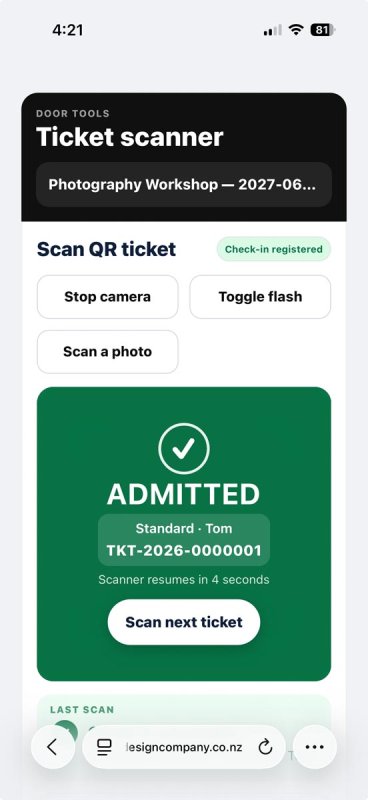
- Door scanning — check in attendees from a mobile camera or manual search, with duplicate, invalid, refunded and wrong-event responses.
- Frontend organiser dashboard — let assigned organisers view sales and orders, export attendees, open the scanner and manage their events and ticket types.
- Orders and attendee operations — search tickets, resend email, issue complimentary tickets, export CSV and print offline door lists.
- Discounts and add-ons — create dated discount codes, optional per-attendee discounts, merchandise and sponsorship add-ons, and protected paid digital downloads.
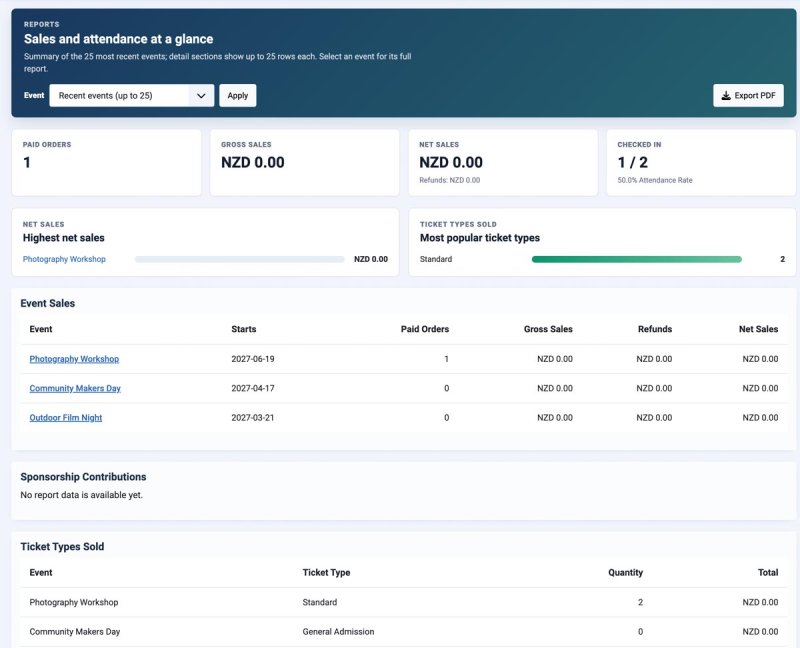
- Refunds and reports — request full or selected-ticket Stripe refunds, track their status and review event sales and attendance reports with PDF export.
- Event line-ups — reuse profiles for performers, speakers, hosts or other configured profile types.
How It Works
- Install the TicketLab Pro package and configure email, currency and Stripe test mode in component Options.
- Create an event, add ticket types, choose its registration fields and publish an Events List or Single Event menu item.
- Customers choose tickets, enter the requested details and complete a free order or Stripe card checkout.
- TicketLab sends QR tickets by email; attendees use a mobile ticket or downloaded PDF at the door.
- Organisers monitor sales and check in arrivals, while administrators manage orders, refunds and reports.
Requirements: The current package targets Joomla 5.4 or 6.1, PHP 8.3+, a MySQL-compatible database and HTTPS for live checkout and camera scanning. A Stripe account is required for paid card sales. The supplied interface is in English and can use Joomla language overrides.
TicketLab Pro code is distributed under the GNU GPL version 2 or later. A Pro subscription provides access to new downloads, authenticated updates and support.
Free vs Pro
What Each TicketLab Pro Role Can Do
| Task | Visitor | Assigned organiser | Administrator |
|---|---|---|---|
| Browse published events and line-ups | Yes | Yes | Yes |
| Book free or paid tickets | Yes | Yes | Yes |
| Open mobile and PDF tickets | With the order link | With the order link | From order management |
| View event sales and recent orders | No | Assigned events | All permitted events |
| Create and edit events or ticket types | No | Assigned events; creation requires permission | Yes, subject to Joomla permissions |
| Export attendees and scan tickets | No | Assigned events | With the relevant permission |
| Configure Stripe, organiser assignments and payment options | No | No | Yes |
| Issue refunds and manage email templates | No | No | With the relevant permission |
Releases
Event ticketing
- Create events with venue, date and time, capacity, sales windows, category, image, description and publication status.
- Offer free and paid ticket types with separate prices, capacities, quantity limits, sales windows and attendee-name settings.
- Publish an upcoming-events list, single-event page and event-specific line-up page through Joomla menu items.
- Collect configurable booking contact name and Town / City details, plus order-level and attendee-level registration fields.
Checkout and ticket delivery
- Take card payments through Stripe-hosted Checkout, with signed webhook reconciliation and inventory holds while checkout is pending.
- Issue individual QR admission tickets, mobile ticket pages and printable PDF downloads; email tickets after confirmation.
- Offer fixed or customer-entered-price add-ons, including protected paid digital downloads and sponsorship contributions.
- Add fixed or percentage discount codes, including event/date restrictions and optional per-attendee application.
- Optionally display inclusive tax and send Stripe or TicketLab receipt formats.
Event operations
- Assign a lead organiser and additional organisers to an event. The frontend organiser dashboard shows assigned-event sales, orders, ticket types, attendee exports and editing actions.
- Scan mobile tickets at the door or search manually; distinguish valid, already-used, refunded, invalid and wrong-event responses.
- Search and export attendees, print offline door lists, issue complimentary tickets and resend ticket email.
- Request full-order or selected-ticket Stripe refunds, track pending results and review refund history.
- Review event-filtered sales and attendance reports with PDF export.
Packaging and compatibility
- Package version: `0.8.123`; Joomla package element: `pkg_ticketlabpro`.
- Current project requirements target Joomla 5.4 or 6.1, PHP 8.3+, a MySQL-compatible database and HTTPS for live checkout and camera scanning. Verify the exact public compatibility range before publication.
- The package includes GPL licence text, first-party file notices and third-party library notices. TicketLab Pro code is GNU GPL v2 or later.
- This version changes packaging and licence metadata after 0.8.122. No application behaviour was intentionally changed. The preceding package was functionally exercised, including refunds; install and upgrade checks for this exact ZIP remain part of the release process.
Setup notes
Configure Stripe test mode, its matching webhook signing secret and the required checkout/refund events before enabling live sales. Set Joomla mail delivery and test both a free and paid order. Enter a TDCLab update key in Options → Licence and Updates when a Pro subscription and release are available.