
FAQLab — Documentation
Lightweight FAQ pages for Joomla 5 & 6.
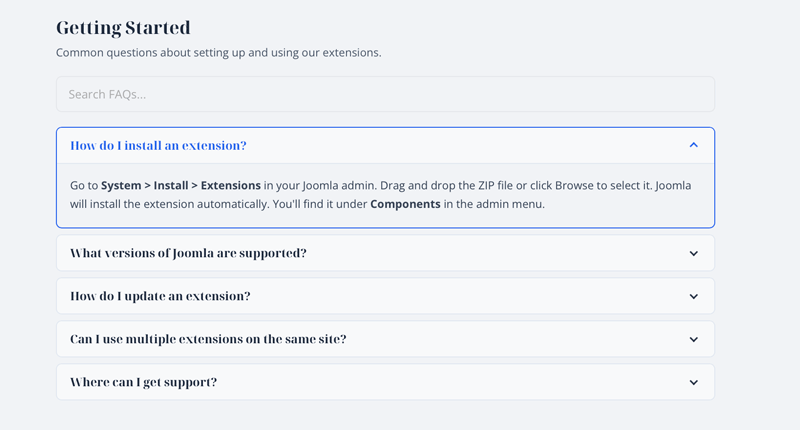
FAQLab is a focused FAQ component that creates organised, searchable FAQ pages with accessible accordions and nested categories. It replaces the frustration of ugly, inflexible FAQ extensions with a clean tool that looks good out of the box and includes Google FAQ schema markup for SEO.
Requirements
- Joomla 5.0 or later (including Joomla 6)
- PHP 8.1 or later
- MySQL 5.7+ or MariaDB 10.3+
Installation
- Download the
pkg_faqlab-1.0.0.zippackage file. - In your Joomla admin panel, go to System > Install > Extensions.
- Upload the package file and click Upload & Install.
- The installer will set up the FAQLab component and the shortcode content plugin.
- Navigate to Components > FAQLab to get started.
Getting Started
Creating Categories
- Go to Components > FAQLab > Categories.
- Click New to create a category.
- Enter a Title (e.g. “General”, “Billing”, “Technical Support”).
- Optionally set a Parent Category to create nested categories.
- Add a Description — this is displayed above the FAQs on the frontend.
- Click Save.
Adding FAQ Items
- Go to Components > FAQLab > FAQ Items.
- Click New to add a FAQ.
- Enter the Question — this is the clickable heading in the accordion.
- Select a Category from the dropdown.
- Write the Answer using the Joomla editor — you can include formatted text, images, links, and embedded media.
- Click Save.
Publishing on the Frontend
There are two ways to display FAQs on your site:
Option 1: Menu Item
- Go to Menus and create a new menu item.
- Set the Menu Item Type to one of:
- FAQ Category — displays FAQs from a single category (with child categories shown inline).
- All FAQ Categories — displays all categories as a card listing or all FAQs grouped on one page.
- For the Category view, select which category to display.
- For the All Categories view, choose the Display Mode (Category Listing or All FAQs Grouped).
- Save and visit the page.
Option 2: Shortcode in an Article
- Make sure the FAQLab — Shortcode plugin is enabled in System > Plugins.
- Create or edit an article and add the shortcode
{faqlab 1}(replacing1with the category ID). - Save and visit the article to see the FAQ accordion embedded in the page.
Category System
FAQLab uses nested categories to organise FAQs. Categories can be nested to any depth.
How Nesting Works
- Top-level categories appear in the category listing view as cards.
- Child categories are displayed inline when viewing their parent category — they appear as sub-headed sections below the parent’s own FAQ items.
- In the admin, the category list shows a tree-ordered view with indentation.
Category Fields
- Title — the category name shown on the frontend.
- Alias — auto-generated URL slug.
- Parent Category — set to create a nested category. Leave as “No Parent (Root)” for top-level.
- Description — optional text displayed above the FAQ items on the frontend.
Display Options
Layout: Accordion vs Flat List
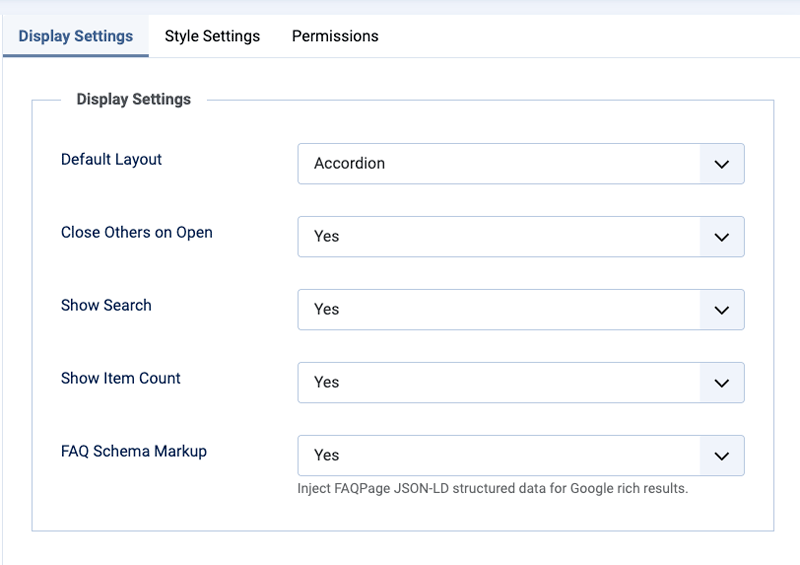
FAQLab supports two display layouts, configurable in Components > FAQLab > Options > Display Settings:
- Accordion (default) — questions are clickable headings that expand to reveal answers. One or all panels can be open at a time.
- Flat List — all questions and answers are visible at once, separated by dividers. No toggle interaction.
Display Mode: Listing vs All Grouped
When using the All FAQ Categories menu item type, choose between:
- Category Listing — shows top-level categories as clickable cards in a responsive grid. Each card links to the full category view.
- All FAQs Grouped — shows every category with its FAQ items on a single page, grouped under category headings.
Close Others
When enabled (default), opening one accordion panel automatically closes any other open panels. Disable to allow multiple panels open simultaneously.
Show Search
Enables a search bar above the FAQ items. Search filters instantly across both questions and answers with no page reload.
Show Item Count
Shows a count badge (e.g. “5 FAQ(s)”) next to category headings.
FAQ Schema Markup
When enabled (default), FAQLab injects FAQPage JSON-LD structured data on every FAQ page. This enables Google FAQ rich results in search.
Style Options
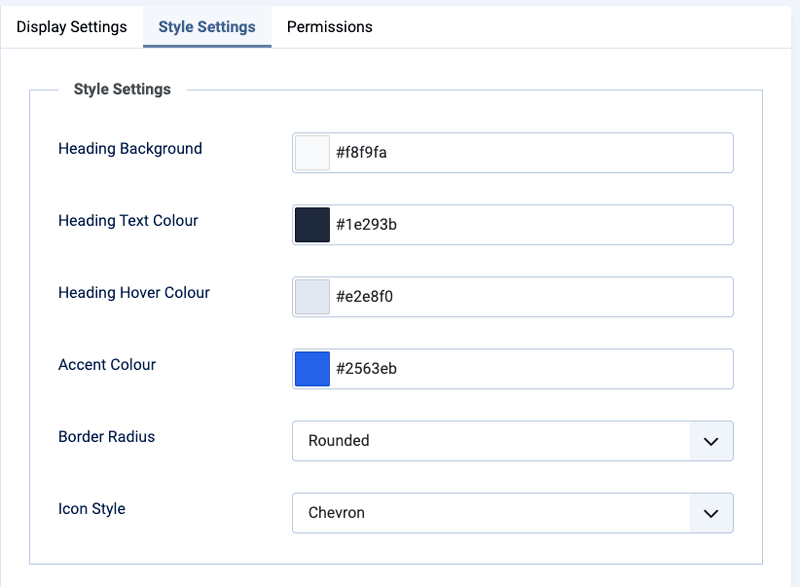
Configure the visual appearance in Components > FAQLab > Options > Style Settings:
- Heading Background — background colour for accordion question rows.
- Heading Text Colour — text colour for questions.
- Heading Hover Colour — background colour on hover/focus.
- Accent Colour — used for active/expanded state, focus rings, search focus, and category card hover.
- Border Radius — Square, Rounded (default), or Pill.
- Icon Style — Chevron (default), Plus/Minus, or None.
All colours are applied via CSS custom properties, making them easy to override in template CSS if needed.
Shortcode Embedding
FAQLab includes a content plugin that lets you embed FAQ categories in articles and custom HTML modules.
Setup
- Go to System > Plugins and ensure FAQLab — Shortcode is enabled (it is enabled by default on install).
- In any article, add the shortcode where you want the FAQs to appear:
{faqlab 1}
Replace 1 with the ID of the category you want to display. You can find category IDs in the Components > FAQLab > Categories list.
Usage Tips
- The shortcode renders the same accordion (or flat list) as the component views, with all style options applied.
- You can embed multiple categories on the same page using different IDs.
- Add introductory text or other content around the shortcode — it renders inline within the article.
- The shortcode works in standard articles and in any content that triggers Joomla’s content prepare event.
- JSON-LD schema is included when the shortcode renders.
Google FAQ Schema
FAQLab automatically generates FAQPage structured data in JSON-LD format. This tells Google that your page contains FAQ content and can trigger rich results in search.
What Gets Included
- Every published FAQ item on the page is added to the schema.
- When viewing a parent category, child category items are also included.
- The shortcode plugin also injects schema for its rendered items.
Disabling Schema
If you don’t want schema output (e.g. you’re using another SEO extension for structured data), set FAQ Schema Markup to No in the component options.
Template Overrides
Styling
FAQLab ships with clean default styling that works on most templates. To customise, create template overrides:
templates/{your-template}/html/com_faqlab/category/default.phptemplates/{your-template}/html/com_faqlab/categories/default.php
CSS Classes Reference
.faqlab— outer container with CSS custom properties.faqlab--flat— modifier when flat list layout is active.faqlab-header— title and count wrapper.faqlab-title— category heading (h2).faqlab-subtitle— child category heading (h3).faqlab-description— category description text.faqlab-search— search bar container.faqlab-search-input— search input field.faqlab-accordion— accordion container.faqlab-item— individual accordion item.faqlab-item.is-active— open/expanded item.faqlab-trigger— clickable button within question.faqlab-icon— toggle icon (chevron/plus-minus).faqlab-answer— collapsible answer panel.faqlab-answer-inner— answer content wrapper.faqlab-flat-list— flat list container.faqlab-flat-item— individual flat list item.faqlab-flat-question— flat list question heading.faqlab-flat-answer— flat list answer content.faqlab-categories— category card grid.faqlab-category-card— individual category card.faqlab-category-group— grouped category section.faqlab-no-results— search no-results message
CSS Custom Properties
Set via inline style on .faqlab, overridable in your template CSS:
--faqlab-heading-bg--faqlab-heading-text--faqlab-heading-hover--faqlab-accent--faqlab-radius
Changelog
Version 1.0.0 (April 2026)
- Initial release
- Nested category system with unlimited depth
- Accessible WAI-ARIA accordion with keyboard navigation
- Flat list layout option
- Live client-side search across questions and answers
- FAQPage JSON-LD structured data for Google rich results
- Content plugin for shortcode embedding via
{faqlab ID} - Two display modes: category listing and all FAQs grouped
- Rich text answers with Joomla editor
- Configurable style options (colours, border radius, icon style)
- Close-others accordion behaviour
- Responsive mobile-first design
- Vanilla CSS/JS with zero dependencies
Support
For help, feature requests, or bug reports, visit the FAQLab page on the TDCLab extensions site:
https://extensions.thedesigncompany.co.nz
Licence
FAQLab is free software released under the GNU General Public License v2 or later.