
Includes: Admin Module, Plugin
PreviewLab
A lightweight preview password gate for Joomla development, staging, and coming-soon sites. Protect the frontend with one shared password, style the access screen, and manage preview access quickly from the administrator dashboard.

About this Extension
PreviewLab is a lightweight preview password gate for Joomla 5 and 6. It protects a development, staging, or coming-soon frontend behind one shared password while leaving the Joomla administrator area available for normal site work.
PreviewLab
Key Features:
- Frontend Preview Gate — require a shared preview password before visitors can view the public site.
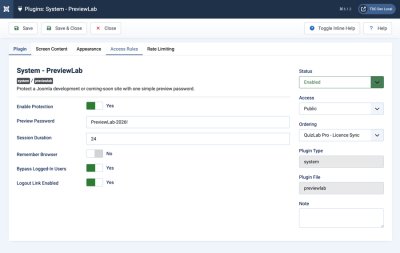
- Simple Password Management — keep the current password visible in the plugin settings while PreviewLab maintains a validation hash automatically.
- Session Access — grant access for a configurable number of hours after a successful login.
- Remember Browser Option — optionally keep trusted reviewers signed in with a signed, HTTP-only browser cookie.
- Safe Return Redirects — send reviewers back to the page they originally requested after they enter the correct password.
- Logged-In User Bypass — allow authenticated Joomla users to bypass the preview gate when enabled.
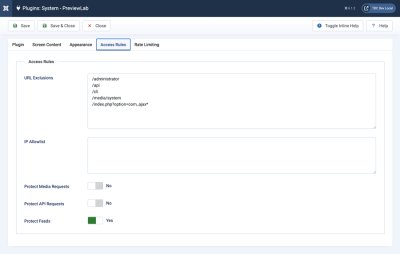
- URL Exclusions — exclude custom paths or query patterns from preview protection.
- IP Allowlist — allow trusted IPv4 or IPv6 addresses and CIDR ranges to bypass the password gate.
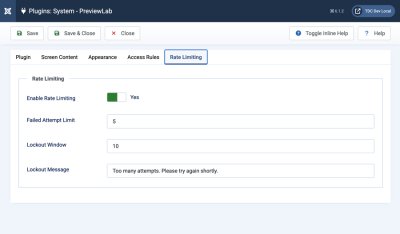
- Rate Limiting — limit failed password attempts with a configurable lockout message and time window.
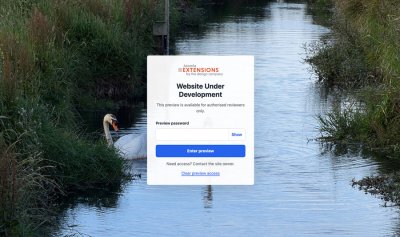
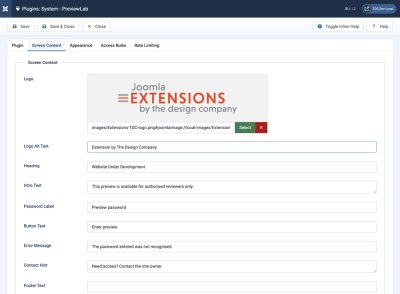
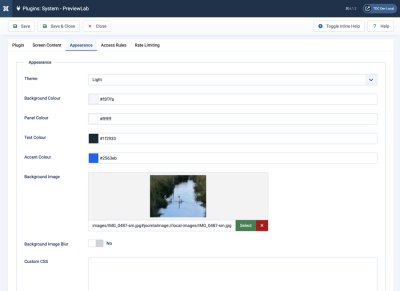
- Branded Access Screen — customise the heading, intro text, labels, logo, background image, colours, theme, and custom CSS, with light, dark, and auto themes.
- Preview Logout — provide a stable logout URL and optional frontend preview status panel so reviewers can clear access.
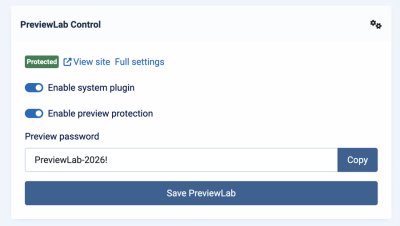
- Administrator Dashboard Module — quickly enable the system plugin, toggle preview protection, edit the preview password, copy it, and jump to full settings.
- No Database Tables — stores settings in Joomla extension parameters and uses a signed browser cookie and Joomla's cache.
How It Works:
- Install the package through Joomla's extension installer.
- Open System > Manage > Plugins and edit System - PreviewLab.
- Enter a preview password, enable protection, and adjust branding or exclusions if needed.
- Share the preview password with approved reviewers.
- Use the optional administrator dashboard module for quick day-to-day control.
PreviewLab is designed for Joomla-powered sites before launch. It cannot protect content served by a CDN, reverse proxy, or static full-page cache before the request reaches Joomla.
Releases
What's New
System plugin v1.1.0 and administrator module v1.1.0. This is a recommended security update for all users.
Security
- Fixed a URL-exclusion bypass: a duplicated `option` parameter could reach protected content through the default com_ajax exclusion. Query-string exclusions now compare parsed parameter values.
- The gate now runs before routing (`onAfterInitialise`), so pages cached by System - Page Cache and router 404 pages can no longer be shown to visitors without access.
- Failed-attempt rate limiting is now tracked per IP address (in Joomla's cache) instead of per session, so it can't be reset by discarding cookies. Locked-out requests return HTTP 429.
Fixes
- Login could fail if the password was first saved while the plugin was disabled (PHP 8 hash detection always reported "hashed").
- Preview access is now held in a signed cookie, so it lasts the full Session Duration instead of ending with Joomla's (usually 15-minute) session timeout.
- Changes saved from the dashboard module now apply immediately when Joomla caching is on.
- The dashboard module's Full settings link now opens the plugin settings.
- The gate's response headers (`noindex`, content type) are now actually sent, and the gate is marked `Cache-Control: no-store`.
- URL exclusions now work for sites installed in a subfolder.
- The Preview mode bar no longer appears when protection is switched off.
- The dashboard module redirects after saving, so a page refresh doesn't resubmit.
Improvements
- Dark theme now has a proper dark palette; new Auto theme follows the visitor's system setting. Colours left at their defaults follow the theme; button text contrast is automatic.
- IPv6 addresses and CIDR ranges in the IP allowlist; visitor IP detection honours Joomla's Behind Load Balancer setting.
- On first install the plugin is enabled (inactive until a password is set) and the dashboard module is published to the Home Dashboard.
- Help text added for every setting; duration fields now state their units.
- Dashboard module rebuilt on the legacy module pattern; copy button no longer uses inline JavaScript.
What's New in 1.0.9
- Improved password synchronisation between the plugin settings screen and administrator control module
- More consistent handling for legacy hash-only password settings during upgrades
Description
PreviewLab is a lightweight preview password gate for Joomla 4, 5, and 6. Protect a development, staging, or coming-soon frontend with one shared password, a branded access screen, configurable exclusions, reviewer sessions, and quick administrator dashboard controls.
What's New in 1.0.8
- Current package release with system plugin v1.0.8 and administrator module v1.0.2
- Frontend preview gate with a configurable shared password
- Automatically maintained password hash while keeping the current password visible in settings
- Session authentication with configurable duration
- Optional signed remember-browser cookie
- Safe return redirect after successful login
- Logged-in Joomla user bypass option
- URL exclusions with wildcard support
- IPv4 and CIDR allowlist support
- Optional media, API, and feed protection controls
- Session-based failed-attempt rate limiting and lockout message
- Branded responsive gate screen with custom heading, intro text, labels, logo, background image, colours, theme, and custom CSS
- Password visibility toggle on the preview gate
- Stable logout URL:
/?previewlab_action=logout - Optional frontend preview status panel with logout link
- Administrator module for quick plugin enablement, protection toggle, password edits, copy action, full settings link, and frontend link
- No custom database tables