
Includes: Component, Plugin
QuizLab Pro
Professional quizzes and learning paths for Joomla 5 and 6 — with eight assessable question types, Content Slides, conditional explanations, outcome redirects, reusable PDF certificate templates, path progress, and performance reports.
Build assessments, quiz series, and structured learning programmes for training, education, or membership sites without a heavyweight LMS. Add questions individually or import them from a CSV spreadsheet, group quizzes into Learning Paths, then deliver smooth AJAX-driven frontend experiences with instant feedback, progress tracking, automatic marking, manual essay review, and certificates.

About this Extension
QuizLab Pro 2 is a professional quiz and learning-path component for Joomla 5 and 6. Create interactive assessments with eight scored question types, informational Content Slides, conditional feedback, outcome redirects, analytics, a global question bank, structured Learning Paths, and reusable PDF certificate templates.
See QuizLab Pro in action




Who It’s For
- Training coordinators and L&D teams — assess staff knowledge with automatic marking, essay questions for deeper responses, manual review, Learning Paths, and PDF certificates for compliance or professional development records
- Schools and educators — run timed online assessments with randomised questions, a leaderboard, and per-student result tracking without a heavyweight LMS
- Course creators and membership site owners — group quizzes into structured paths, gate course completion behind quiz progress, issue certificates to passing learners, and monitor performance with per-question analytics
- Developers building Joomla sites — clean PSR-4 MVC architecture, CSV import for large question libraries, a global question bank, and template overrides for full control over the frontend output
- HR teams running knowledge assessments — build assessments with essay answers, manage the manual review queue, and export rich attempt reports for auditing
Key Features:
- Eight Assessable Question Types — Multiple Choice (2–20 options), True/False, Numeric, Short Answer, Multiple Select, Fill in the Blank, Essay/Long Answer, and Ordering.
- Informational Content Slides — place rich text, images, video, or other Joomla-supported media between questions without affecting scores.
- Essay Manual Review — essay answers queue for admin grading; a dedicated Review Queue in both the admin and frontend lets reviewers award points and leave feedback before results are finalised.
- Percentage-Based Scoring — set a pass mark per quiz (0–100%). Learners see their score, pass/fail status, and optionally a full question-by-question review.
- Conditional Explanations — use no explanation, one shared explanation, or different guidance for correct and incorrect answers.
- Question & Result Redirects — show buttons or automatically direct learners to related articles, revision material, handouts, or follow-on content after a question, pass, or fail result.
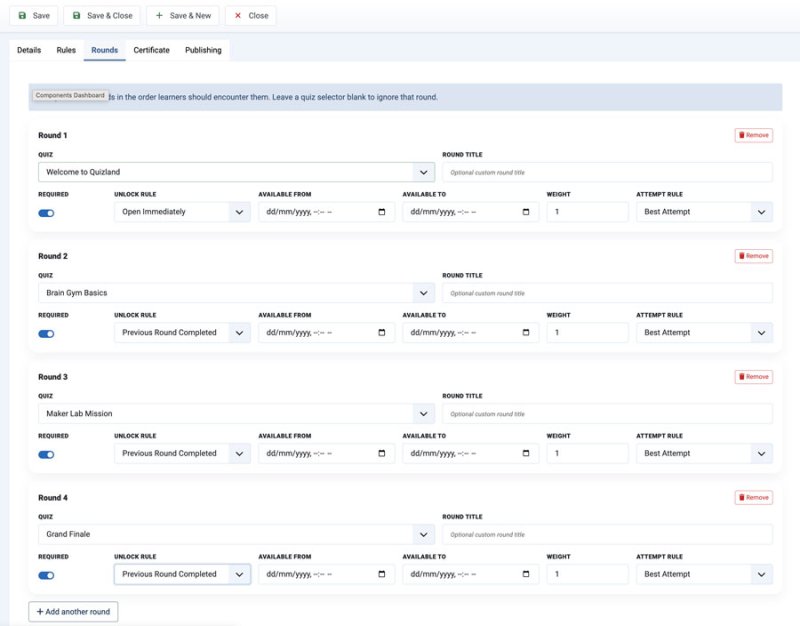
- Learning Paths — group quizzes into ordered programmes, competitions, or assessment journeys with required rounds, progress tracking, overall scores, and learner next actions.
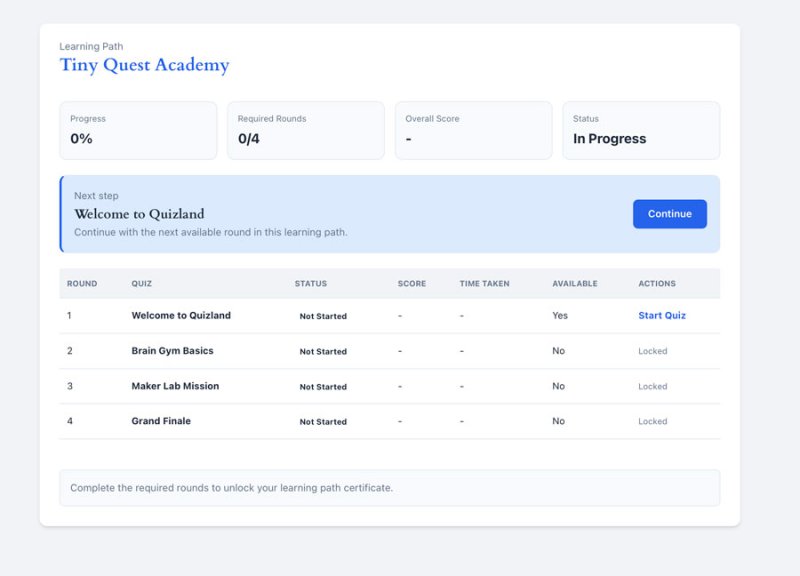
- My Learning Paths — give logged-in learners a frontend dashboard showing available paths, progress, completion status, and the next round to continue.
- Path Reports — review participants, round progress, completion status, pending reviews, overall scores, path certificates, and export path data to CSV.
- Time Limits — optional per-quiz countdown timers with automatic submission on expiry.
- Leaderboard — optional per-quiz leaderboard for logged-in learners.
- My Results — learners can review all their past attempts from a dedicated frontend page.
- Question Randomisation — randomise question and answer order; set how many questions to draw from the bank per attempt.
- Navigation Modes — free navigation or linear (sequential, no skipping).
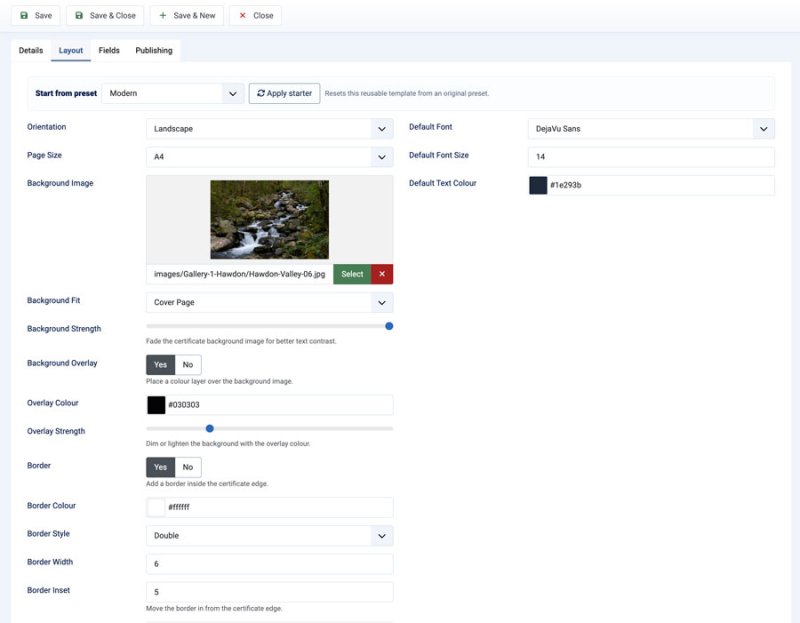
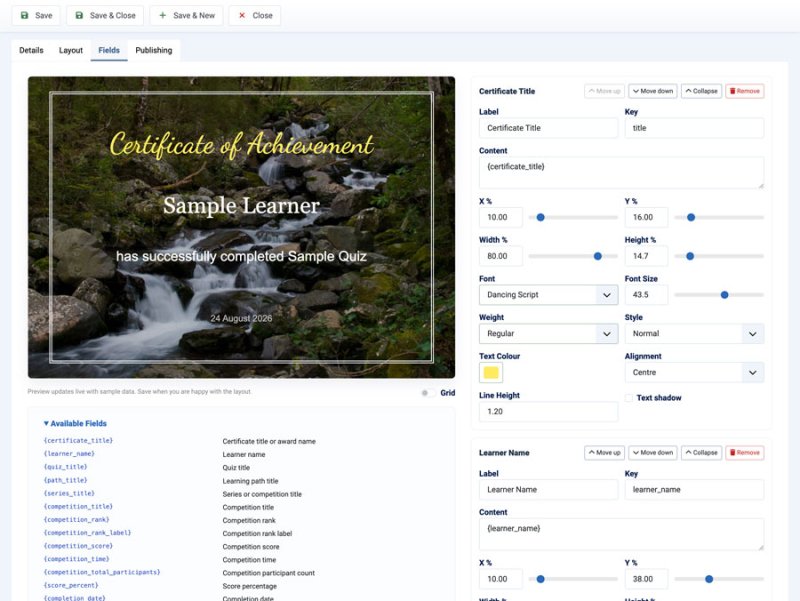
- Reusable PDF Certificate Templates — create branded templates with background images, positioned fields, typography and colour controls, token support, and unique verification URLs for quiz and path certificates. Legacy presets (Modern, Classic, Minimal, Bold) remain available for existing quiz certificates.
- Question Bank — global cross-quiz question browser with full search and filtering, copy questions between quizzes, bulk category and difficulty editing, and usage tracking across quizzes.
- Question Performance Reports — per-question analytics covering answer volume, correct/incorrect rates, average time, answer distribution, and common wrong answers. Filterable by quiz, type, category, difficulty, and signal. CSV export included.
- CSV Import/Export — bulk import all question types, Content Slides, conditional explanations, and question destinations with auto-column mapping, live preview, and three import modes (Append, Update, Replace).
- Session Recovery — if a learner's browser closes mid-quiz, progress is saved and automatically resumed.
- Admin Dashboard — metric cards with drill-down to per-quiz question reports, recent attempts, and a pending review counter.
- Attempt Management — full attempt history with filtering, detailed attempt review, and rich CSV export.
- Question Categories & Difficulty — tag questions for organised bank management and category-level performance reporting.
- Question Images — attach images with alt text to questions and answer options.
- Drag & Drop Ordering — reorder questions with native Joomla drag handles.
- Quiz Duplication — duplicate quizzes with all questions and options in one click.
- Customisable Labels — change button text and feedback messages per quiz.
- Responsive Design — clean frontend that works on all screen sizes.
- Lightweight — vanilla CSS and JavaScript, no frameworks, no jQuery dependency.
How It Works:
- Create a quiz and configure scoring, time limit, styling, and certificate options
- Add assessable questions or Content Slides, then configure categories, difficulty, explanations, and optional destinations
- Or bulk import questions from a CSV spreadsheet
- Create a menu item pointing to the quiz, or group quizzes into a Learning Path and publish the path view
- Learners take quizzes, follow path progress, and receive instant results and certificates
- Review essay answers in the admin or frontend Review Queue, then monitor quiz and path reports
Built for Joomla 5 and 6 using modern architecture: PSR-4 namespacing, DI container, WebAsset API, RouterView SEF routing, and bundled Dompdf for zero-dependency PDF generation.
Free vs Pro
| Feature | Free | Pro |
|---|---|---|
| Core quiz delivery | ✓ | ✓ |
| Joomla 5 and 6 support | ✓ | ✓ |
| Included languages | English | English, Dutch, and German |
| Question types | 3 core types | 8 assessable types |
| Informational Content Slides | — | ✓ |
| Answer explanations | Shared | Shared or conditional |
| Formatted answer options | — | Line breaks, bold, italic, and underline |
| Question and result redirects | — | ✓ |
| Time limits and randomisation | — | ✓ |
| Essay manual review | — | ✓ |
| PDF certificates | Basic | Reusable templates and legacy presets |
| Learning paths and quiz series | — | ✓ |
| Path progress and reports | — | ✓ |
| Question bank and reports | — | ✓ |
| Support | Basic | Priority |
Releases
What's New
- Multiple-choice, multiple-select, true/false, and ordering answers support line breaks. Authors can press Enter or type
\nin the answer field. - Answer options support safe inline formatting with
<b>,<strong>,<i>,<em>,<u>, and<br>tags. Unsupported markup and attributes are not rendered. - Formatting is preserved in learner quiz choices, completion summaries, and answer review.
- My Results includes a Review Answers link when the quiz allows learners to see answer details.
- The per-quiz Show Time Taken on Results setting controls elapsed-time visibility on completion results, attempt details, and My Results.
Fixes
- Corrects quiz durations affected by the server timezone, including timed-attempt restoration and expiry.
- Hides time values in My Results for quizzes where Show Time Taken on Results is disabled.
What's New
- Adds German (
de-DE) language files for the QuizLab Pro package, component admin and frontend interfaces, shortcode content plugin, and licence-sync system plugin. - Includes reviewed German terminology refinements for reports, certificate-template background controls, collapsible fields, and attempt-deletion messages.
What's New
- Adds Dutch (`nl-NL`) language files for the QuizLab Pro component admin and frontend interfaces.
- Adds rich-text editors for hints and shared, correct-answer, and incorrect-answer explanations.
- Hints and explanations now support paragraphs, hard returns, bold, italic, underline, bullet points, and numbered lists in immediate feedback, full result summaries, and attempt details.
Compatibility
- Existing plain-text hints and explanations retain their authored line breaks without needing to be edited and saved again.
- Frontend formatting is limited to the supported basic elements; unsupported tags and attributes are removed.
What's New
- Adds Learning Paths for grouping existing quizzes into ordered programmes, quiz series, competitions, or assessment journeys.
- Adds frontend Learning Path and My Learning Paths views so learners can see available paths, round status, progress, overall scores, completion status, and next actions.
- Adds admin Learning Path management, path reports, combined path progress, participant tracking, certificate counts, and CSV export.
- Adds reusable Certificate Templates with background images, positioned fields, typography controls, colours, overlay/border settings, token support, and quiz/path assignment.
- Adds path-level certificate generation and verification support.
- Adds shared question assignment foundations so quizzes can reuse canonical questions while historical attempts preserve the served question snapshot.
- Adds Content Slide support for informational rich-text or media steps inside quiz flows.
- Adds a Learning Path filter to the admin Quiz Manager.
- Adds per-quiz theme highlight colour, button colour, and custom CSS fields for frontend styling.
- Adds Joomla asset support for quizzes so ownership and permissions can be represented through Joomla's asset system.
Fixes
- Fixes a Learning Path Report error caused by binding a cast expression instead of a variable in the qualifying-attempt query.
- Repeat randomised attempts now receive a fresh question order while active attempts keep a stable order after refresh.
- Timed attempts now close cleanly when expired instead of resuming into a broken first-question-only state.
- Registered-user attempts now store learner name/email at start, with admin results falling back to the Joomla user record when certificate/student fields are empty.
- Category quotas now support difficulty selectors such as `difficulty:easy=5`, respect `Questions to Show` as the final cap, and shuffle mixed quota results instead of grouping questions by rule order.
- Certificate-template upgrade columns are now repaired idempotently during install/update so v2 upgrades do not stop on duplicate `background_opacity`, overlay, or border columns.
Fixes
Restores v1 feature parity after v1.1.93.
Notes
This is a v1 maintenance hotfix for sites affected by the v1.1.93 feature regression.
Changelog
- Restored Conditional Explanations for assessable questions, including separate correct and incorrect explanations in the question editor, CSV import/export, immediate feedback, final summaries, and attempt detail views.
- Restored quiz-level Auto-start so selected quizzes can skip the intro screen and begin immediately.
- Restored Display Points During Quiz so running score visibility can be controlled per quiz.
- Restored Content Slides as non-assessable quiz steps that do not require answer options, do not affect score totals, and continue cleanly in authored quiz flow.
- Restored pass/fail result redirects, including button and automatic redirect modes.
- Restored question-level redirects, including button and automatic redirect modes where enabled at quiz level.
- Restored support for up to 20 answer options per question in the editor and CSV import/export.
- Added installer repair logic so upgraded v1.1.93 sites regain any missing quiz and question columns without needing a manual database fix.
- Aligned v1 package, component, plugin, build, and media asset version metadata to v1.1.94.
Fixes
Randomised attempts and timed quiz navigation.
Changelog
- Repeat attempts now receive a fresh random question order instead of reusing the same order from the learner session.
- Active attempts keep a stable order while they are in progress, including after page refresh.
- Timed attempts now close cleanly when expired instead of resuming into a broken first-question-only state.
- The retry button reloads the quiz page so the next attempt receives its own server-rendered question set.
- Registered-user attempts now store the learner's Joomla name and email at start, and admin attempt/review lists fall back to the Joomla user record when certificate/student fields are empty.
- Category quotas now support difficulty selectors such as `difficulty:easy=5`, `difficulty:medium=5`, and `difficulty:hard=5`.
- `Questions to Show` is applied as the final cap after quota selection, and mixed quota results are shuffled so questions are not served grouped by rule order.
Fixes
Joomla database schema check for decimal scoring columns.
Changelog
- Reworked the v1.1.79 score-column migration syntax so Joomla's database schema checker recognises the existing decimal columns correctly.
- Added a v1.1.92 repair migration that re-applies the `score_earned` and `points_earned` decimal definitions for sites already reporting the schema warning
Fixes
- QuizLab Pro quizzes now use a Pro-specific frontend root and initialisation marker, preventing the QuizLab Free script from attempting to initialise shortcode or standard Pro quizzes when both extensions are present.
What's New
- Option-based questions now support up to 20 options in the editor and CSV import/export.
- Adds a per-quiz Display Points During Quiz setting so the running points total can be hidden without changing final scoring or results.
Fixes
- Pass percentages set to
0now save correctly at quiz level instead of being reset to 80%. - New quiz forms now respect the global Default Pass Percentage setting, including
0.
What's New
- Adds conditional explanations to question editors.
- Explanation Type offers no explanation, one shared explanation, or different explanations for correct and incorrect answers.
- Correct explanations appear only for fully correct answers; incorrect explanations also cover partial-credit answers that do not earn full credit.
- Immediate feedback, end-of-quiz summaries, and attempt detail views use the appropriate explanation.
- Essay questions retain the shared explanation option because correctness is determined later through manual review.
- Existing explanations are automatically preserved as shared explanations during upgrade.
- CSV import and export support explanation mode and separate correct/incorrect explanation fields.
What's New
- Adds Content Slide as an informational step within a quiz flow.
- Content slides support rich text, images, and media handled by Joomla content plugins.
- Learners select Continue without submitting an answer.
- Content slides are recorded as viewed for resume and completion tracking, but carry no points and are excluded from scoring, correct-answer totals, attempt answer details, and question-performance reports.
- Random question selection keeps content slides in the authored flow while randomising or selecting assessable questions around them.
- CSV import and export support the
content_slidequestion type. - Renames the component-level Import menu to Migrate from QuizLab Free so it is clearly distinct from per-quiz CSV import/export.
- The migration empty state now confirms that QuizLab Pro is standalone and that users should not install QuizLab Free merely to use Pro.
Notes
- The question editor hides answer, scoring, hint, explanation, category, and difficulty controls for Content Slides.
- Quizzes containing Content Slides display their total as steps rather than questions.
Fixes
Certificate PDF orientation.
Changelog
- Certificate downloads now respect the configured portrait or landscape orientation.
- Certificate page dimensions and print styling now match the selected orientation.
- Admin certificate previews use the same configured orientation as generated PDFs.
What's New
Question feedback timing
Multiple select score modes
Changelog
- Added a quiz-level Question Feedback setting with After Each Question and At the End Only options
- At the End Only mode submits each answer and advances straight to the next question without showing immediate correct/incorrect feedback or explanations.
- Final results and configured result detail still control what learners see after completion.
- Added a Multiple Select Scoring setting to multiple-select questions.
- Exact Match keeps the existing all-correct-and-no-wrong-selections behaviour.
- Partial Credit awards points for correct selections and subtracts credit for incorrect selections, never below zero.
- Score storage now supports decimal earned points for partial-credit answers.
- Added a Partial Credit with Selection Limit mode for multiple-select questions.
- This mode limits learners to the number of correct answers, awards credit for each correct selection, and does not penalise wrong selections.
What's New
Frontend Review Queue menu view.
Changelog
- Added a frontend Review Queue menu item for authorised QuizLab Pro reviewers.
- Reviewers can see pending essay attempts, queue totals, learner details, and direct Review Now links.
- Authorised reviewers can open attempt details from the frontend and save manual essay grades.
- Normal learners remain restricted to their own My Results and attempt detail pages.
Improvements
Attempt detail score clarity.
Changelog
- Attempt detail score cards now show points beside the percentage, for example `53.9% (7/13)`
Improvements
Logged-in certificate generation.
Changelog
- Logged-in learners no longer need to enter their name and email again when generating an end-of-quiz certificate.
- Certificates issued from the result screen now use the learner's Joomla account name and email when available.
- Guest learners still see the name/email certificate form.
Fixes
Essay points in timed-out scoring
Changelog
- Essay question points now count toward the maximum possible score for served quiz attempts.
- Timed-out attempts with unanswered essay questions now treat those essay points as missed, instead of shrinking the denominator.
- Manual review recalculation preserves the full attempt denominator and keeps incomplete attempts marked as timed out after review.
What's New
Expanded the admin reporting workflow
Changelog
- Added a Signal filter for review, pending review, no-attempt, and healthy questions
- Added a Category & Difficulty Performance summary panel to identify weak areas faster
- Added pending review to the global reporting metric cards
- Report summaries now respect the active report filters
- CSV export continues to use the active filtered report set
What's New
Added CSV export for admin question reports.
Changelog
- Reports toolbar now includes a CSV export action
- Export respects the active report filters and ordering
- CSV includes question identity, quiz, type, category, difficulty, points, answer volume, correct/incorrect counts, average score, average time, pending review count, and signal